A Shopify app for wholesale
Collect tax exemption certificates from wholesale buyers
For Shopify merchants who sell wholesale in the US and Canada. Buyers upload their resale or status-card certificate on your store, you approve it, and the app sets Shopify's tax exemption on their customer record.
Free for up to 3 approved certificates, then US$12 a month with a 7-day free trial, billed by Shopify.
Available on the Shopify App Store
Install it from the listing in your Shopify admin. The paid plan starts with a 7-day free trial.
View in the App Store- Price
- Free up to 3 approved certificates; US$12 a month for more
- Trial
- 7 days free on the paid plan
- Billing
- Through Shopify
- Regions
- US states and Canadian provinces
- Needs
- The Online Store sales channel
How it works
From a buyer's upload to the exemption on their customer record, in four steps.
A buyer uploads a certificate
Send wholesale buyers one link on your own store. The page takes your theme's look and asks for the details you need to check the certificate. Files can be PDF, JPG or PNG, up to 5 MB.
Your buyer link
your-store.com/apps/exempt
The form asks for
- Business name
- State or province
- Certificate type
- Number
- Expiry date
- The file
You review it in one queue
Open the app in your Shopify admin. Each certificate shows the business, issuing state, number and expiry. Download the file, then approve or reject. A rejection needs a reason, which is emailed to the buyer.
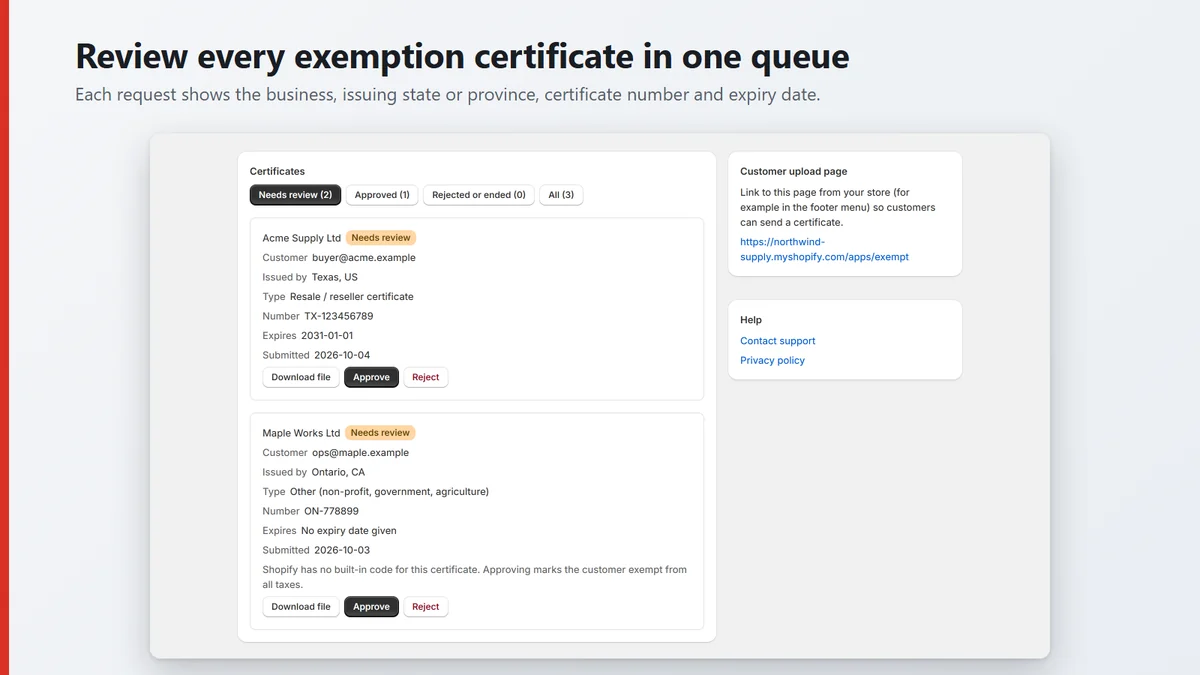
Review every exemption certificate in one queue. Approval sets Shopify's tax exemption
Where Shopify has a matching code, approving applies that exemption to the buyer's customer record. The app creates the customer if your store has none.
Where Shopify has no code, for example a resale certificate from Ontario or Quebec, Approve stays off until you tick that you are granting a full exemption.
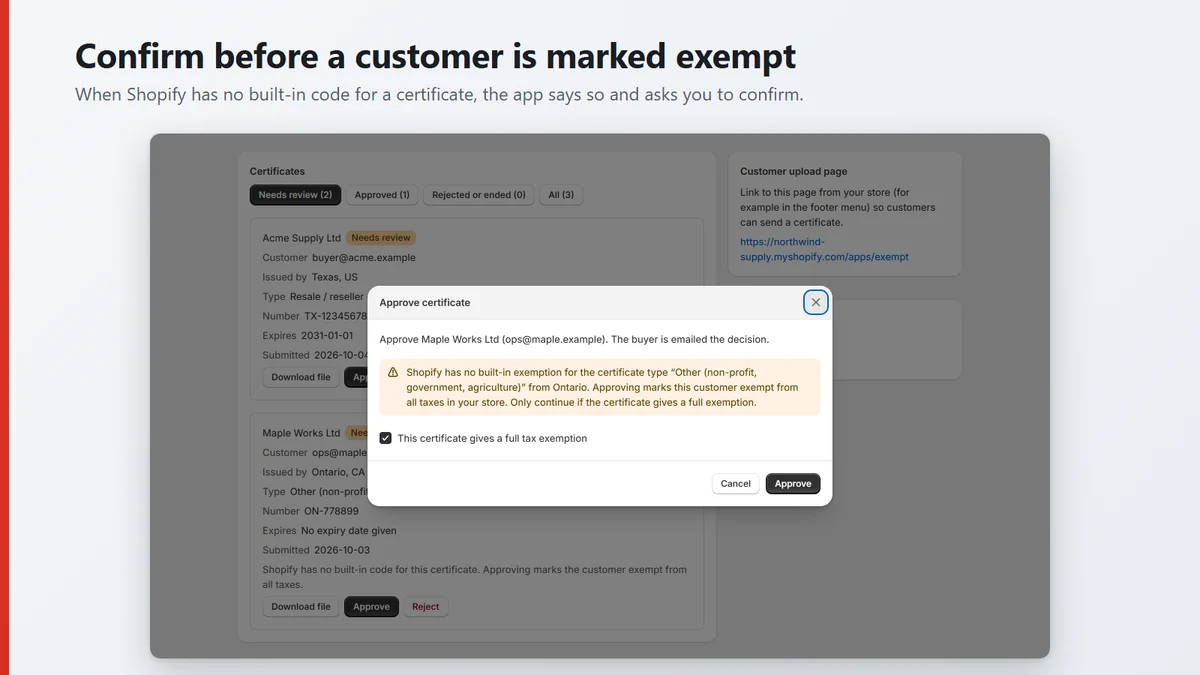
Confirm before a customer is marked exempt. The buyer is told, and the exemption ends on time
The buyer gets an email when you approve or reject, 30 days before the certificate expires, and when it expires. On the expiry date the app removes the exemption. You can revoke it yourself at any time (revoking sends no email).
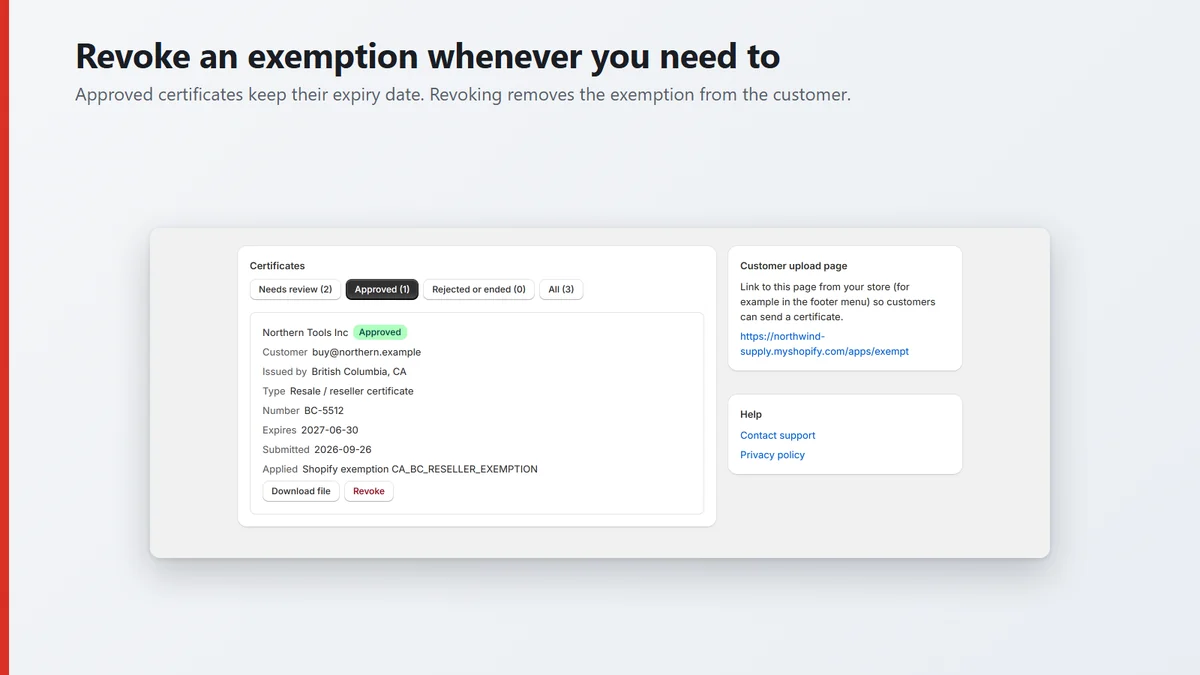
Revoke an exemption whenever you need to.
Screenshots show demo data from a development store.
What it does and does not do
It does
- Collect certificates on a storefront page that follows your theme.
- Keep every certificate in one review queue with its file, state, number and expiry.
- Set the matching Shopify tax exemption when you approve, and remove it when you revoke or the certificate expires.
- Email the buyer on approval, on rejection, 30 days before expiry and at expiry.
- Store certificate files encrypted.
It does not
- Check that a certificate is genuine or valid for what you sell. You decide that when you approve it.
- Calculate, file or remit tax.
- Give tax or legal advice. Ask your accountant which certificates you must keep.
- Cover exemptions for buyers who check out as guests: the exemption applies to the customer account that matches the certificate's email.
Where Shopify has no matching exemption code, as for resale certificates from Ontario, the app does not guess: it asks you to confirm a full exemption yourself before you can approve.
Pricing
Start free. Upgrade when you need more than 3 approved certificates. No setup fee and no per-certificate charges.
Free
US$0
- Up to 3 approved certificates at a time
- Up to 20 waiting for review and 25 MB of stored files
- Same features, review queue and buyer emails as the paid plan
- Revoking a certificate frees a place
Nothing is charged, and you can upgrade from inside the app at any time.
Exempt
US$12 a month
7-day free trial
- Unlimited approved certificates, no per-certificate fees
- Review queue, approvals, rejections and revocations
- Buyer emails and automatic expiry
- Billed by Shopify on your Shopify invoice
Switch back to Free at any time from the Plans panel in the app; your certificates and files are kept. Uninstalling the app also stops billing but deletes your data. Cancel during the trial and you pay nothing.
Questions
Which regions does it cover?
US states and Canadian provinces. Shopify has built-in resale exemptions for US states and for British Columbia, Manitoba and Saskatchewan, and built-in exemptions for Canadian status-card and diplomat certificates. For other cases, such as a resale certificate from Ontario or Quebec, the app asks you to confirm a full exemption before you can approve.
Does my buyer need a customer account?
The app creates a customer record for the certificate's email if your store has none. Shopify applies the exemption to that customer account, so the buyer must be signed in to it at checkout. Guest checkout is not exempted.
Where are certificate files stored, and are they encrypted?
Files, business names and certificate numbers are encrypted with AES-256-GCM and held on Cloudflare. Other fields the app needs to match buyers and send notices (email, state or province, type, expiry, review status) are stored as plain record fields. The privacy policy has the full table.
Who can see a buyer's data?
You, in the app in your Shopify admin, and the buyer, by email about their own certificate. Hexloom Labs does not read certificates except to fix a problem you report to support. Nothing is sold. The only providers that process data are Shopify, Cloudflare (hosting) and Resend (email).
What happens to the data when I uninstall?
The access token is deleted at once. Shopify then sends a store erasure request, normally about 48 hours later, and all of your store's certificates, files and history are deleted. Tax exemptions already set on customers stay in Shopify until you remove them. The file of a rejected certificate is deleted at once. Rejected, revoked and expired certificates are deleted 90 days after the decision.
What do I need on my store?
The Online Store sales channel, because the buyer page is an app proxy page on your storefront. No Shopify Plus plan is required.